


 購物車 / 產生報價單




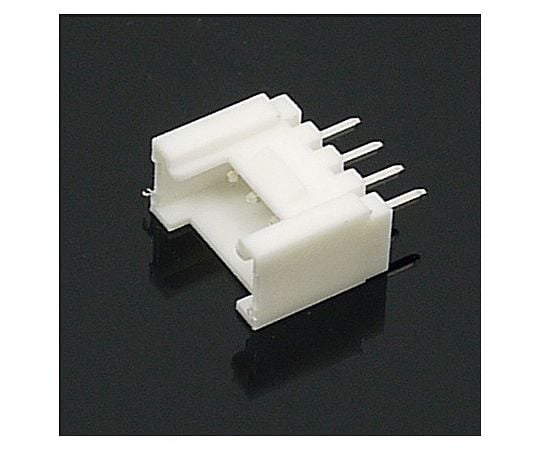
商品圖片僅供參考,選購時請再留意商品規格
Seeed Studio GROVE-通用型 4 針連接器 (10 件裝) 110990030
商品包含多種型號及規格,請點選「立即選購規格」挑選
💡 重要通知:
因中東戰爭造成原物料波動影響,若訂單成立後進貨成本發生重大異動,我們將主動聯繫您協商處理。造成不便,敬請見諒。

月結報帳 / 信用卡 / 銀行轉帳

宅配快速到貨,滿 NT$ 999 元即享免運!
選購型號
商品介紹
Specification
- What is the GROVE System?
- This is a modular product group in which various electronic components are mounted on a board with a uniform external shape and can be used simply by connecting with a specified cable. It is mainly for learning, and compared with the conventional method using a breadboard, functions can be extracted easily and quickly without unnecessary trouble in mounting parts.
- It is similar to Arduino and other microcomputer-based systems, but GROVE is not focused on a specific MCU, but mainly on modules that individually implement peripheral devices such as sensors, switches, and displays.
- This allows it to be applied to various systems such as Arduino, LPCXpresso, mbed and small Linux PCs. A bridge shield is also available for each system.
- Each module basically has only one component and is extremely simple. Documentation and sample programs are included or available for download. All you need to do is connect all the modules with a common cable. By using a dedicated bridge shield such as Arduino, you can add peripheral devices according to your purpose by combining GROVE series modules and cables without creating a new assembly.
- If you use seeeduino, an Arduino compatible product from seeedstudio, the connector for GROVE is included from the beginning, and you can use Arduino assets such as sample code. seeeduino is also mbed compatible.
- http://www.seeedstudio.com/wiki/GROVE_System
- 4-pin connector for GROVE. (Straight type for substrate mounting)
- We sell 1 pack of 10 pieces. Since the pitch is 2 mm, please pay attention to the board specifications.
- ◎You can check the operation with the sample sketch provided with the module.
- When you combine it with an Arduino, you can easily check how it works by using a sample sketch published on the manufacturer's website.
- Since the detailed device-specific programs in the GROVE module are stored in a library, the device functions can be operated with a simple description.
- However, the main sketches are only for checking the operation of the module and for reference on how to use the library. In some cases, it is not practical to check the minimum operation.
- ◎There are also modules where you can use the Arduino IDE sketch examples out of the box.
- For example, in the case of Grove-Servo (ROB08211P), the sample sketch is taken directly from (File) - (example sketch) -SERVO-SWEEP in the Arduino IDE. In such a case, there is no description of the sample sketch directly on the manufacturer's site.
- ◎You may need more than one GROVE module to move the sample sketch.
- Most GROVE modules have instructions on their manufacturer's site. If you use a sample sketch, you may need more than one module in addition to the one described. When using a sample sketch, check the peripheral setup on the manufacturer's site in advance and confirm what is required.
- ◎Knowledge of Arduino and other microcomputer hardware and programming is required.
- The GROVE system greatly simplifies the installation of microcomputer peripheral devices by unifying connection connectors.
- However, you can't simply install the software in a set of modules to create the desired set. Compared to PCs, there is no application software (* There are libraries for Arduino sample sketches and drivers for checking the operation of individual modules.).
- For example, if you want to build a thermometer with an LCD display, the Arduino and GROVE expansion shield, temperature sensor module, LCD module, connection cables, and power supply are all the hardware you need, but there are not always instructions on how to connect and combine them, and sample sketches that show how they work.
- The signal assigned to the connector has several variations depending on the device mounted on the module.
- There are things like I2C, which can be shared by multiple devices as a bus, or UART, which is a one-to-one device and microcomputer with unified specifications, and there are things like LEDs and volume, which are unique to a particular GROVE module. Program software that understands the hardware to achieve the desired functionality.
Package size
- 95x70x10mm
- 0.01kg
以上圖片及相關資訊由 AS ONE提供。
若有現場安裝、說明或特殊配送需求,歡迎事前與科研市集聯繫。部分商品因供應條件限制,可能無法提供相關服務,敬請見諒。