





 購物車 / 產生報價單



取消
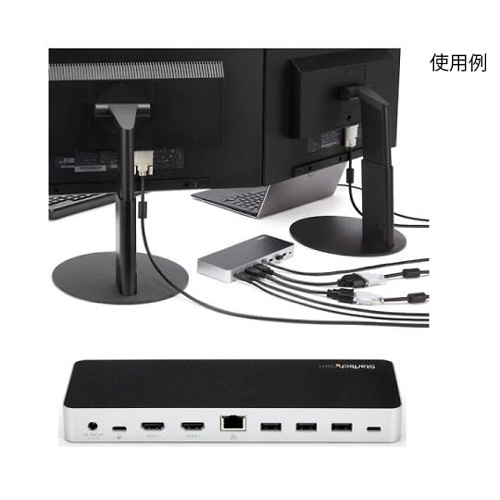
商品圖片僅供參考,選購時請再留意商品規格
Docking station/USB Type-C連接/USB 3.1 Gen 1/雙屏/HDMI或DVI/60瓦USB PD/4 x USB-A, 1 x USB-C集線器/GbE/3.5毫米音頻/Windows MST30C2HHPD MST30C2HHPD
Docking station/USB Type-C connection/USB 3.1 Gen 1/dual monitors/HDMI or DVI/60 W USB PD/4 x USB-A, 1 x USB-C hub/GbE/3.5 mm audio/Windows MST30C2HHPD
商品包含多種型號及規格,請點選「立即選購規格」挑選

月結報帳 / 信用卡 / 銀行轉帳

宅配快速到貨,滿 NT$ 999 元即享免運!
選購型號
商品介紹
Feature
- Laptop Dock
- 60 W Power Delivery
- Dual HDMI/DVI
- No Display Driver Required
Specifications
- Fast charging port: Yes
- Factory default (package) Weight: 1.4 kg
- PXE: Yes
- UASP support: Yes
- Auto MDIX: Yes
- Type and rating: USB 3.0 -5 gbit/s
- Full duplex support: Yes
- Compatible networks: 10/100/1000 mbps
- Maximum data transfer speed: 5 gbps (USB 3.0), 2 gbps (Ethernet); Full-Duplex)
- Maximum Digital Resolution: 1920 x 1200 p @ 60Hz (HDMI/DVI - dual monitor), 4096 x 2160 p @ 24 Hz (HDMI - single monitor), 3840 x 2160 p @ 30 Hz (HDMI - single monitor), 1920 x 1200 p @ 60Hz (DVI - single monitor)
- Enclosure Type: Plastic
- Color: Black
- Product width: 80 mm
- Product Weight: 258 g
- Product length: 220 mm
- Product height: 24 mm
- Industry Standard: USB power supply spec Rev. 2.0, USB battery charging specification Rev. Backward compatible with 1.2, DisplayPort 1.2 + mST, IEEE 802.3, IEEE 802.3 u, IEEE 802.3 ab, USB 3.0 - USB 1.1/2.0
- Supported displays: 2
- Bus type: USB-C
- Chipset IDs: VIA/VLI-VL 813, MegaChips-STDP 4320, Realtek-RTL 8153, C-Media-cm 6533, Texas Instruments - TPS 65983
- 4K support: Yes
- OS compatibility: Windows 7, 8, 8.1, 10,
- Connector types: USB Type-C (24 pin) USB 3.0, USB Type-A (9 pin) USB 3.0, USB 3.0 A (Fast charging, 9 pin, SuperSpeed), RJ -45, HDMI (19 pin), 3.5 mm minijack (4 poles)
- Input Voltage: 100 to 240 AC
- Input current: 2A
- Output Voltage: 20 V DC
- Output Current: 5 A
- Power Consumption: 100 W
- power supply: AC adapter included
- Storage temperature: -20 degrees Celsius, to 70 degrees Celsius
- Operating temperature: 0 C to 40 C
- Humidity: 5% to 95 %RH (noncondensing)
- Package Contents: 1m USB-C to USB-C Cable, HDMI-DVI Adapter, Quick Start Guide, Docking Station, Universal AC Adapter (North America/Japan, Australia & New Zealand)
- Power Delivery:60W
- Center Tip Polarity: Positive
- Plug Type: N
- System and Cable Requirements: Windows Notebook personal computer with an empty USB-C port (USB Power Delivery 2.0 and DP Alt mode must be supported on the USB-C port of the connected laptop personal computer in order to take full advantage of the adapter's capabilities.)
- Note:Before using the docking station, make sure the laptop personal computer's drivers, firmware, and operating system have been updated. To get 4K resolution, you'll need a 4K-capable HDMI display. Video output capabilities depend on the video card and hardware specifications of the connected notebook personal computer. Some video cards have limited MST support, and some monitors may have limited resolution. Not all USB-C ports are fully compatible with USB Type-C Standards. Note Make sure the USB-C port on your personal computer supports DP Alt mode and USB Power Delivery. USB 3.0 is also known as USB 3.1 gen 1. Speeds in this Standards range up to 5Gbps. Not all Thunderbolt 3 USB-C ports are fully compatible with Thunderbolt 3 Standards. Make sure the Thunderbolt 3 port on your laptop personal computer supports USB Power Delivery. Mac OS and Chrome OS do not support MST. A dual-monitor configuration requires a Windows laptop personal computer that supports MST.
- Code: ZU 201 N7
Package size
- Package size:160×270×95 mm 1.42 kg
以上圖片及相關資訊由 AS ONE提供。
若有現場安裝、說明或特殊配送需求,歡迎事前與科研市集聯繫。部分商品因供應條件限制,可能無法提供相關服務,敬請見諒。